What is a trusted execution environment? TEEs for AI workloads, explained
Timon Agar
Engineering and product team.
When you send a prompt to an AI service via an API, the service needs to process your data to generate a response. As the request travels across the network, transport encryption protects the request data, but the AI service must still decrypt it before the model can use it. If the API service runs on a cloud GPU, there's a possibility your prompt data may be exposed to the infrastructure that hosts the API.
A trusted execution environment (TEE) addresses this problem by securing the execution of code and data while a program processes it. In principle, a TEE offers two guarantees that keep your code and data secured: hardware-enforced isolation and remote attestation. Hardware-enforced isolation limits who can access the workload's memory, even when the underlying GPU belongs to a third-party cloud provider. On the other hand, remote attestation lets you verify claims about the hardware and software running your workload before you send sensitive information.
In this post, we'll explain TEEs and illustrate their capabilities in modern machine learning security. By the end, you'll have a clear understanding of how TEEs can protect your AI workloads and ensure data privacy for your ML applications.
TL;DR
- A TEE protects code and data while they're being processed using hardware-based security.
- TEEs help protect sensitive AI data, such as prompts and private source code, during inference.
- Remote attestation lets you verify that a TEE is genuine and running trusted software.
- TEEs have limitations, so you should understand their security guarantees and verify the environment before trusting it with sensitive data.
What is a trusted execution environment?
A trusted execution environment is a hardware-isolated area of a processor (CPU or GPU) where code can run securely and data can be processed confidentially, protected from software outside the environment. When you run code inside a TEE, software outside the TEE's trust boundary, including the host operating system and hypervisor, cannot read its protected data.
To understand this better, imagine a TEE as a sealed room in a building. The building owner controls the building but cannot simply enter the room and read or modify anything inside it. The room is designed to protect its contents, and attempts to access or modify them without authorization will be detected and flagged.
Before a remote party can trust the environment, the TEE must provide cryptographic evidence, through a process called remote attestation, that it's a genuine environment running the expected code in an acceptable security state.
A TEE works in a similar way. You can think of the sealed room as the hardware-isolated environment, while remote attestation is the process of verifying cryptographic evidence about that environment.
TEE vs. enclave vs. confidential VM
As you read more about TEEs, you'll come across terms like 'enclave' and 'confidential VM.' While they are sometimes used interchangeably in product documentation, understanding their differences is important.
A TEE is the umbrella term that refers to an execution environment that uses hardware protections to isolate code and data from software outside its trust boundary.
An enclave is an isolated execution domain that protects a specific application process or selected code and data. The rest of the application and the host operating system remain outside its secure boundary. For example, Intel SGX allows an application to execute sensitive operations inside an enclave without placing the entire application within that boundary.
Using our sealed-room analogy, an enclave is like a smaller, secure room within the sealed room. While the sealed room represents the application's TEE, the smaller room provides an additional layer of protection for selected code and data. The OS can manage the application outside the enclave, but it cannot directly access the enclave's protected contents.
A confidential VM (CVM), on the other hand, protects a virtual machine's memory and execution state against privileged software such as the hypervisor. Intel Trust Domain Extensions (TDX) and AMD Secure Encrypted Virtualization-Secure Nested Paging (SEV-SNP) support this approach. Additionally, a CVM can run a full operating system and its applications within the protected domain.
How TEEs developed
The evolution of hardware-enforced data security began with Arm TrustZone, a security mechanism that splits a processor's execution resources into two isolated environments: a Secure World (Trusted Execution Environment) and a Normal World (Rich Execution Environment).
Intel SGX later introduced application-level enclaves on server and desktop processors. These enclaves offered strong isolation for selected code and data, although applications had to account for their restricted memory model.
Next, confidential VMs expanded the protection boundary to include an entire guest operating system. Intel TDX and AMD SEV-SNP protect virtual machines against certain attacks by the host and hypervisor.
More recently, confidential computing has expanded to GPUs. NVIDIA GPUs such as the H100 can operate in confidential computing mode, extending hardware-based protection beyond the CPU to the GPU that runs the model. This helps protect model weights and sensitive data in GPU memory while securing data transfers between the CPU and GPU over the PCIe interconnect.
Why TEEs matter for AI workloads
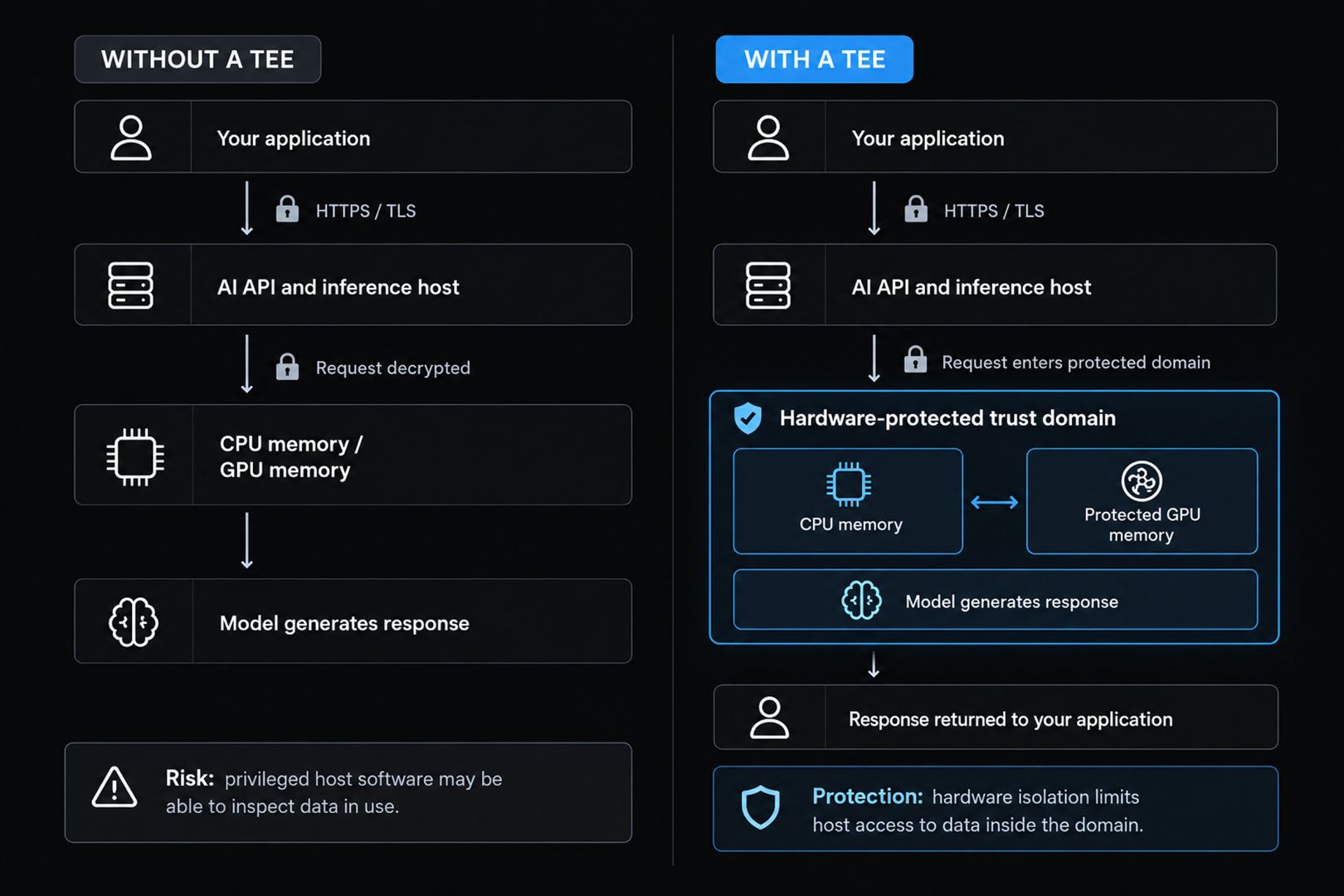
Most traditional encryption methods protect data at rest (stored on disk) and in transit (moving over a network). However, in AI and ML systems, prompts and data are exposed and executed in plain text inside memory during inference, leaving them susceptible to bad actors.
Encryption at rest protects stored information, such as a database or disk, while Transport Layer Security (TLS) protects information while it travels between a client and an API. Neither protection, by itself, prevents a privileged host administrator from reading data after the service decrypts it for processing.
Imagine you want to send a private configuration file and a prompt to a model like Qwen3.8-27B to find a bug. TLS encrypts your request while it travels to the API. When it arrives, the API gateway decrypts it and passes the prompt and source code to the model.
Without confidential computing, parts of the hosting infrastructure with sufficient privileges may be able to access this data while it is being processed. If the host is compromised, your data could also be at risk. TEEs were developed to close this security gap.
How a trusted execution environment works
A typical TEE-backed workload combines several stages to protect sensitive data while a computation is running. These stages establish a protected execution environment, control how data enters and is processed within it, and provide mechanisms for verifying that the workload runs within the expected security boundary.
The four stages below illustrate how a typical TEE-backed AI workload protects a prompt as it moves through the inference process.
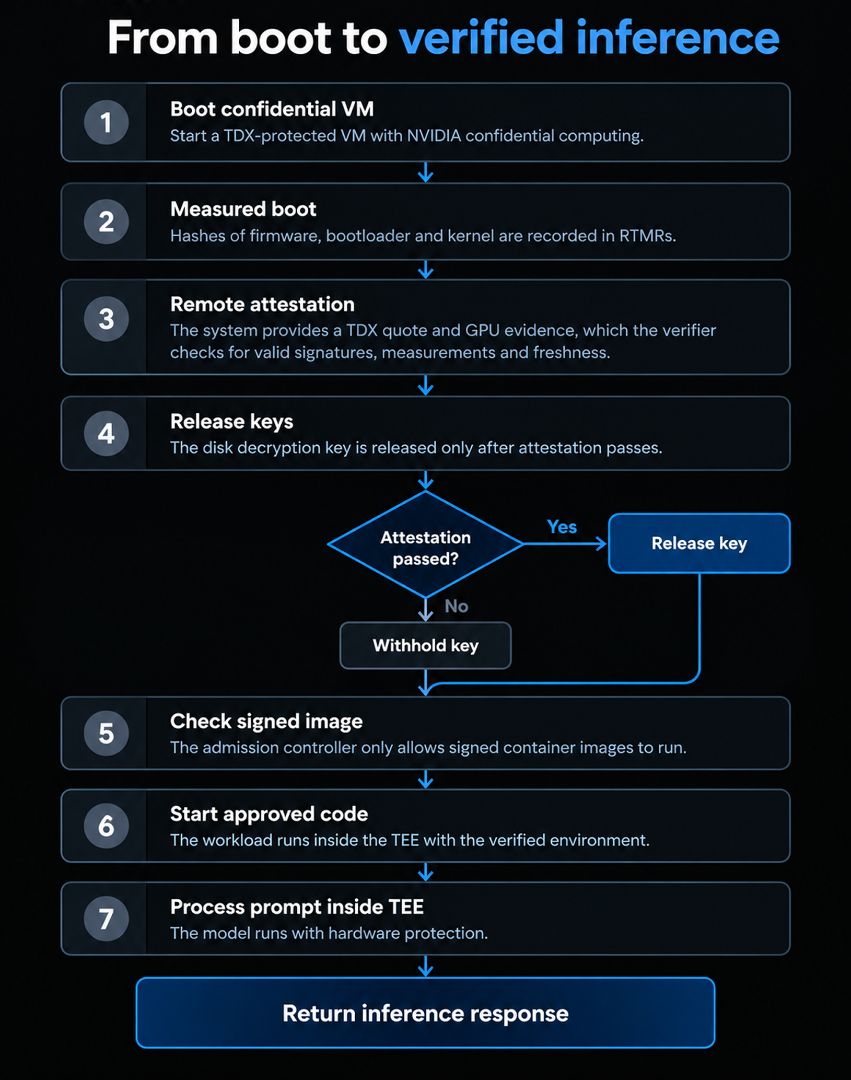
1. Isolation
In this stage, the computer's CPU locks and encrypts a specific section of memory using secret keys that no one, not even the host operating system, can see or touch. For example, Intel TDX protects this memory on CPUs, while NVIDIA confidential computing secures data as it travels to and from graphics cards.
2. Measured boot
Every piece of software that loads up, from the basic firmware to the final app, is checked and turned into a unique digital fingerprint (a hash). These fingerprints are stored in special hardware registers such that if even a single byte of the software is changed or tampered with, the final fingerprint will look completely different.
3. Remote attestation
This step verifies the integrity of the environment by generating cryptographically signed attestation reports that let a remote party verify that a workload is running inside a genuine TEE hardware (for example, Intel TDX or NVIDIA Confidential Computing GPUs) with an untampered software stack.
Essentially, this step relies on mathematical proof instead of blindly trusting a cloud provider or host operator's word about security and privacy.
4. Key release
Finally, when the verification succeeds, the remote party safely releases sensitive data, API keys, or encryption keys into the TEE. If any unauthorized modification is detected, the verification process fails, denying the compromised system access to the keys and preserving confidentiality.
What makes a TEE secure, and what it doesn't protect against
While TEEs drastically reduce the attack surface of an AI service, they are not a complete security solution on their own. A TEE provides hardware-enforced isolation, but the security of an AI service depends on the code running inside that boundary and the controls surrounding it. Therefore, understanding the foundational strengths and realistic limits of TEEs is essential for proper threat modeling.
The following are some of the limitations and residual risks that you must consider when working with a TEE-backed model:
- Hardware vulnerabilities: TEEs rely on a hardware root of trust, encrypted memory, and other security features to isolate code and data. However, they are not completely immune to attacks. Side-channel attacks, which use information such as execution time or power consumption to infer sensitive data, remain an active area of research.
- Trust in hardware manufacturers: You still need to trust the companies that design and manufacture the chips, such as Intel and NVIDIA. You also rely on their security mechanisms and signing keys to ensure that only authorized code runs inside the TEE.
- Bugs in your code: A TEE protects the code and data inside its security boundary, but it does not automatically fix bugs or prevent vulnerabilities in that code. If your application has a security flaw, an attacker may still exploit it.
- No guarantee of availability: A TEE protects the confidentiality and integrity of code and data, but it does not guarantee that your service will always be available. For example, an attacker could disrupt the server, block network access, or exhaust available resources.
How Chutes runs AI inference in TEEs
Chutes is a decentralized, serverless inference platform for deploying, scaling, and running open-source models in production. Chutes uses the TEE architecture, which combines Intel TDX confidential virtual machines with NVIDIA GPUs running in confidential computing mode, to ensure the integrity of the compute environment and the privacy of user data.
Intel TDX protects the memory of the confidential virtual machine from the host and hypervisor. NVIDIA Confidential Computing extends protection to GPU workloads, using Protected PCIe to encrypt data transferred between the CPU and GPU. Together, these technologies help protect sensitive data while the model processes it.
Chutes also uses attestation and image-signing checks to control what runs inside this environment. Before a TEE workload starts, the system verifies the hardware attestation evidence and compares the environment's measurements against a known-good configuration. The root filesystem is encrypted using LUKS, and its decryption key is released only after attestation succeeds. A separate admission controller ensures that only container images signed with Chutes' Cosign key can run in the environment. These checks help establish that the workload is running in the expected environment with an approved image.
There are 28 public models available to deploy or run on Chutes, 21 of which are runnable in a TEE. The models having a model ID ending in "-TEE" or whose confidential_compute flag is true are TEE-backed models, meaning they can be run in a fully isolated and verifiable compute environment leveraging Intel TDX and NVIDIA GPUs. We also offer some models without TEE protection; these are marked confidential_compute: false in the models catalog, for public data or any workload where you don't need hardware isolation.
If you want to dive deeper, several parts of the Chutes stack are open source, including sek8s (for TEE infrastructure, confidential VM, encrypted volumes, and cluster bootstrap) and chutes-api (for Platform API, attestation verification, and documentation).
How to verify a Chutes TEE yourself
In this section, we'll walk you through a demo showing how to check whether a model on Chutes is TEE-backed and independently verify its hardware attestation evidence.
Rather than deploying our own model, we'll use an existing public Chute: Qwen3.8-27B-TEE. This lets us inspect a running deployment and request its attestation evidence without creating or deploying a Chute ourselves.
Here are the details of the deployment we'll use:
- Chute name:
chutes-qwen-qwen3-8-27b-tee - Model ID:
Qwen/Qwen3.8-27B-TEE - Chute ID:
9ecb73cc-909b-5334-9cd8-74985945cff5
Step 1: Check that the model is TEE-backed
If you haven't already, sign up for a Chutes account and create an API key from the dashboard. You'll need the key to access authenticated API endpoints later in this walkthrough.
Store your API key in an environment variable in your terminal:
export CHUTES_API_KEY="cpk_..."
Next, to get a list of all models available on Chutes, run the following command:
curl -s https://llm.chutes.ai/v1/models
Next, to filter the list for models marked as supporting confidential compute, let's pipe the response through jq:
curl --fail --silent --show-error \
  https://llm.chutes.ai/v1/models \
  | jq -r '
      .data[]
      | select(.confidential_compute == true)
      | .id
    '
If the request succeeds, you'll see a list similar to this:
Qwen/Qwen3.8-27B-TEE
google/gemma-4-31B-turbo-TEE
deepseek-ai/DeepSeek-V3.2-TEE
zai-org/GLM-5.1-TEE
moonshotai/Kimi-K2.6-TEE
Qwen/Qwen3.5-397B-A17B-TEE
Qwen/Qwen3.6-27B-TEE
zai-org/GLM-5.2-TEE
moonshotai/Kimi-K3-TEE
deepseek-ai/DeepSeek-V4-Flash-0731-TEE
Step 2: Fetch the instance's public keys
Chutes supports end-to-end (E2E) encryption using ML-KEM-768, a post-quantum key-encapsulation mechanism. Each E2E-capable instance generates its key pair inside the TEE when it starts.
To verify that an instance's public key belongs to the attested environment, we need to retrieve the public key and match it to the attestation evidence (Step 4).
The Chutes API has an endpoint for finding E2E-capable instances and retrieving their public keys:
GET https://api.chutes.ai/e2e/instances/{chute_id}
For our example, let's set the Chute ID and save the instance information to a JSON file:
export CHUTE_ID="9ecb73cc-909b-5334-9cd8-74985945cff5"

curl --fail-with-body --silent --show-error \
  "https://api.chutes.ai/e2e/instances/${CHUTE_ID}" \
  -H "Authorization: Bearer ${CHUTES_API_KEY}" \
  | tee e2e-instances.json \
  | jq .
You should see an output similar to this:
{
  "instances": [
    {
      "instance_id": "daf5fc03-ab8b-49fd-84f0-dd94d07a0f41",
      "e2e_pubkey": "<base64-encoded ML-KEM 768 public key>",
      "nonces": ["<nonce-token>", "..."]
    }
  ],
  "nonce_expires_in": 60,
  "nonce_expires_at": 1740000000
}
The instance_id identifies the running instance, while e2e_pubkey contains its public key. The nonces array contains short-lived, single-use tokens used for E2E-encrypted requests. Note that these are not the attestation nonce we'll generate in the next step. The attestation nonce is a separate, randomly generated value used to bind the evidence to a fresh challenge.
Step 3: Request attestation evidence
Now that we've identified the Chute and its instances, we can request the hardware attestation evidence.
First, generate a cryptographically random nonce containing 32 bytes, represented as 64 hexadecimal characters:
NONCE=$(openssl rand -hex 32)
The nonce helps prevent replay attacks by ensuring that the evidence is bound to a fresh challenge. Keep the value generated for this request; we'll need it when verifying the quote.
Next, let's request evidence for the running instances associated with the Chute and save the response:
curl --fail-with-body --silent --show-error \
  --get "https://api.chutes.ai/chutes/${CHUTE_ID}/evidence" \
  -H "Authorization: Bearer ${CHUTES_API_KEY}" \
  --data-urlencode "nonce=${NONCE}" \
  | tee tee-evidence.json \
  | jq .
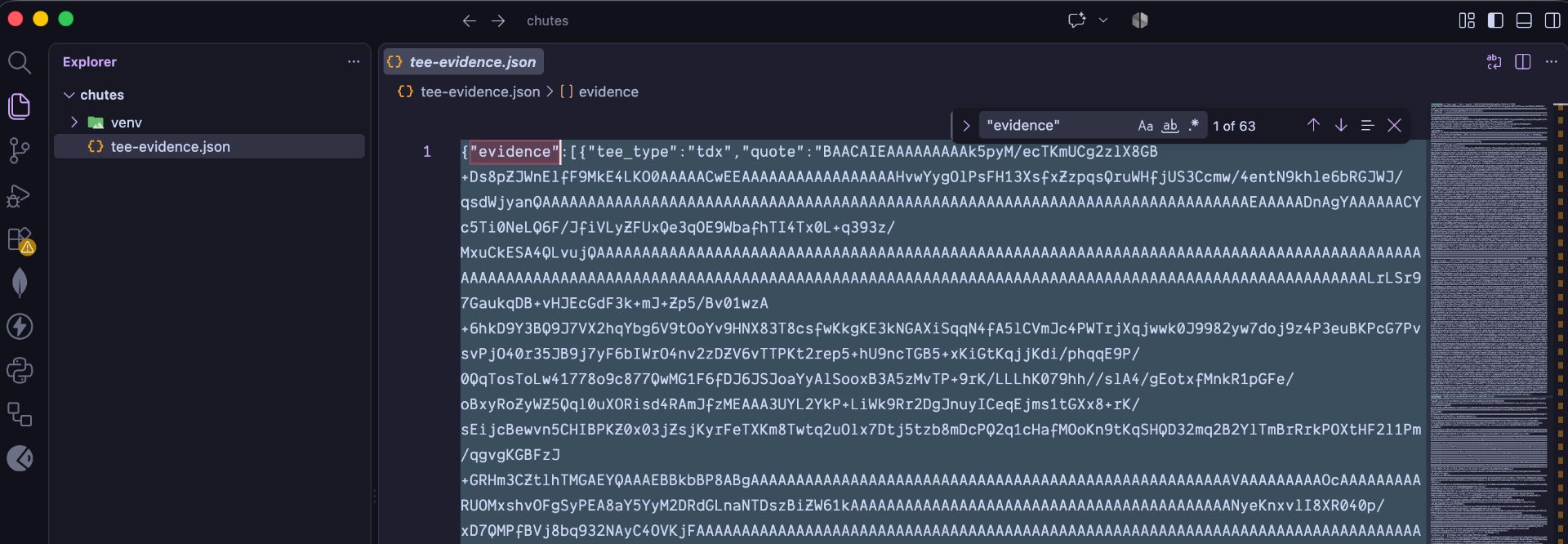
If the command succeeds, you should see a tee-evidence.json file containing the JSON response.
For this example, the request returned 63 records, one for each instance of this chute that was running at that moment. Instances scale with demand, so your count will differ. Each record included a quote, GPU evidence, a certificate, a signature, and an attested body.
Some of the important fields to look for in this result include:
tee_type: The type of trusted execution environment. Our response containedtdx.instance_id: The running instance associated with the evidence.quote: The Base64-encoded Intel TDX attestation quote.gpu_evidence: Evidence used to verify the NVIDIA GPU hardware.certificate: The certificate associated with the attestation response.signatureandattested_body: Fields used to verify the response signature when provided.failed_instance_ids: Instances for which the API could not retrieve evidence during the request.
At this point, we have obtained the material needed for independent verification, but we haven't yet established that the quotes and GPU evidence are cryptographically valid.
The final step is to verify the evidence rather than simply trusting the API response.
Step 4: Verify the hardware evidence
Chutes' verification procedure uses Intel's Data Center Attestation Primitives (DCAP) tooling to verify TDX quotes and NVIDIA's Attestation SDK to verify GPU evidence. The dcap-qvl Python library checks a TDX quote's cryptographic signature and validates it against Intel's attestation collateral, including certificate chains and trusted computing base (TCB) information.
The verification also checks that the E2E public key is bound to the TDX quote.
For each instance with a matching E2E public key:
- Retrieve the instance's
e2e_pubkeyfrome2e-instances.jsonand its TDX quote fromtee-evidence.json, matching the records byinstance_id. - Calculate the SHA-256 hash of the attestation nonce concatenated with the instance's E2E public key, using the encoding specified in Chutes' verification procedure.
- Extract the
report_datafield from the TDX quote. - Compare the calculated hash with the first 32 bytes of
report_data(the first 64 hexadecimal characters).
If the values match, the quote cryptographically binds the supplied nonce and public key to the attested environment. This helps verify that the public key belongs to the environment represented by the quote, rather than relying solely on the API response.
The verification procedure also checks the TDX quote's validity and security attributes, and verifies the GPU evidence. A successful API response alone does not establish that these checks have passed.
For the complete verification procedure and implementation details, see the Chutes TEE verification guide.
When do you need a TEE?
While a TEE provides protection against access by privileged software outside a protected boundary, it also introduces additional configuration and verification requirements. The decision to use a TEE largely depends on the sensitivity of your data and the level of trust you place in the underlying infrastructure provided by the service running your code.
The following table outlines scenarios in which you may or may not need a TEE:
| Workload | Does it need a TEE? | Reason |
|---|---|---|
| Customer records containing personal information | Recommended | Reduces exposure of sensitive data while the model processes it. |
| Coding agents accessing proprietary repositories | Recommended | Helps protect private source code against access by the host or hypervisor. |
| Confidential documents covered by an NDA | Recommended | Adds hardware-backed protections for data in use. |
| Regulated business or financial documents | Depends on your requirements | May help meet security requirements, but does not automatically establish regulatory compliance. |
| Public datasets | Usually unnecessary | The data itself may not need protection against the infrastructure operator. |
| Public benchmarks | Usually unnecessary | Confidentiality may not be a requirement, although other security needs may remain. |
| Early prototyping with synthetic data | Usually unnecessary | You can often test the application without sending sensitive information. |
| Workloads that prioritize inference speed over confidentiality | Depends on the workload | A non-TEE model may suit the performance requirements if the data does not require hardware-backed isolation. |
Wrapping up
TEEs provide an additional layer of protection for sensitive data and AI workloads, but their security depends on more than simply running code inside a protected environment. Trust comes from proof, not claims, and with Chutes, you can independently verify the TEE attestation evidence behind your deployment.
To try confidential inference, send a request to a TEE-enabled model using Chutes' OpenAI-compatible API. The following example sends a simple prompt to Qwen/Qwen3.8-27B-TEE and returns the model's response.
export CHUTES_API_KEY="your-api-key"

curl --fail-with-body --silent --show-error \
  "https://llm.chutes.ai/v1/chat/completions" \
  -H "Authorization: Bearer ${CHUTES_API_KEY}" \
  -H "Content-Type: application/json" \
  -d '{
    "model": "Qwen/Qwen3.8-27B-TEE",
    "messages": [
      {
        "role": "user",
        "content": "Explain confidential computing in one sentence."
      }
    ],
    "stream": false,
    "max_tokens": 100
  }' | jq .
You can also use the same API with other models marked confidential_compute: true in the Chutes model catalog.
Chutes makes it easier to get started with confidential inference, whether you're handling sensitive data, building privacy-focused AI applications, or exploring confidential computing. You can also inspect the available attestation evidence to assess the TEE protections for yourself.
FAQs
What does TEE mean in AI?
A trusted execution environment is a hardware-protected execution domain that helps keep data and code isolated from software outside the domain.
For AI inference, a TEE can protect prompts and model data while the workload processes them. Chutes combines Intel TDX for CPU-side isolation with NVIDIA confidential computing for supported GPU workloads. It also uses attestation and software-integrity checks to verify the execution environment.
Is a TEE the same as a TPM?
No, they are different. A Trusted Platform Module (TPM) is a security component that stores cryptographic keys and records measurements of software or firmware. Applications can use those measurements when deciding whether a system meets a security policy. A TEE isolates code and data while the processor executes a workload.
Although a system may use both technologies as part of its security architecture, a TPM alone does not provide the memory isolation required for confidential inference.
What's the difference between a TEE and an enclave?
TEE is the general term for a hardware-protected execution environment. An enclave is a specific isolated execution domain provided by technologies such as Intel SGX.
Is Chutes inference end-to-end encrypted?
By default, all communication on the Chutes network is end-to-end encrypted (E2EE). Chutes' security architecture ensures that your prompts are encrypted on your machine using post-quantum cryptography, and decrypted only inside a hardware-isolated TEE with encrypted memory and GPU VRAM.
What does "-TEE" in a model ID mean?
Models with -TEE in their IDs run on Intel TDX confidential VMs with NVIDIA GPUs in confidential computing mode. This helps prevent the GPU host from reading your prompts and outputs. In your scripts, a more reliable way to determine whether a model is TEE-backed is to check the confidential_compute flag in the model list.
Is the Chutes API OpenAI-compatible?
Yes. Chutes provides an OpenAI-compatible API at the base URL https://llm.chutes.ai/v1. You can configure a compatible client to use that endpoint and select a model ID returned by the model catalog.